Dynamics 365
CRM consulting.

Know your customers. Grow your business.

We turn our senior team’s more than 20 years of software development experience into user-friendly CRM, automation and AI integrations that create value for your business.

Explore the CRM journey
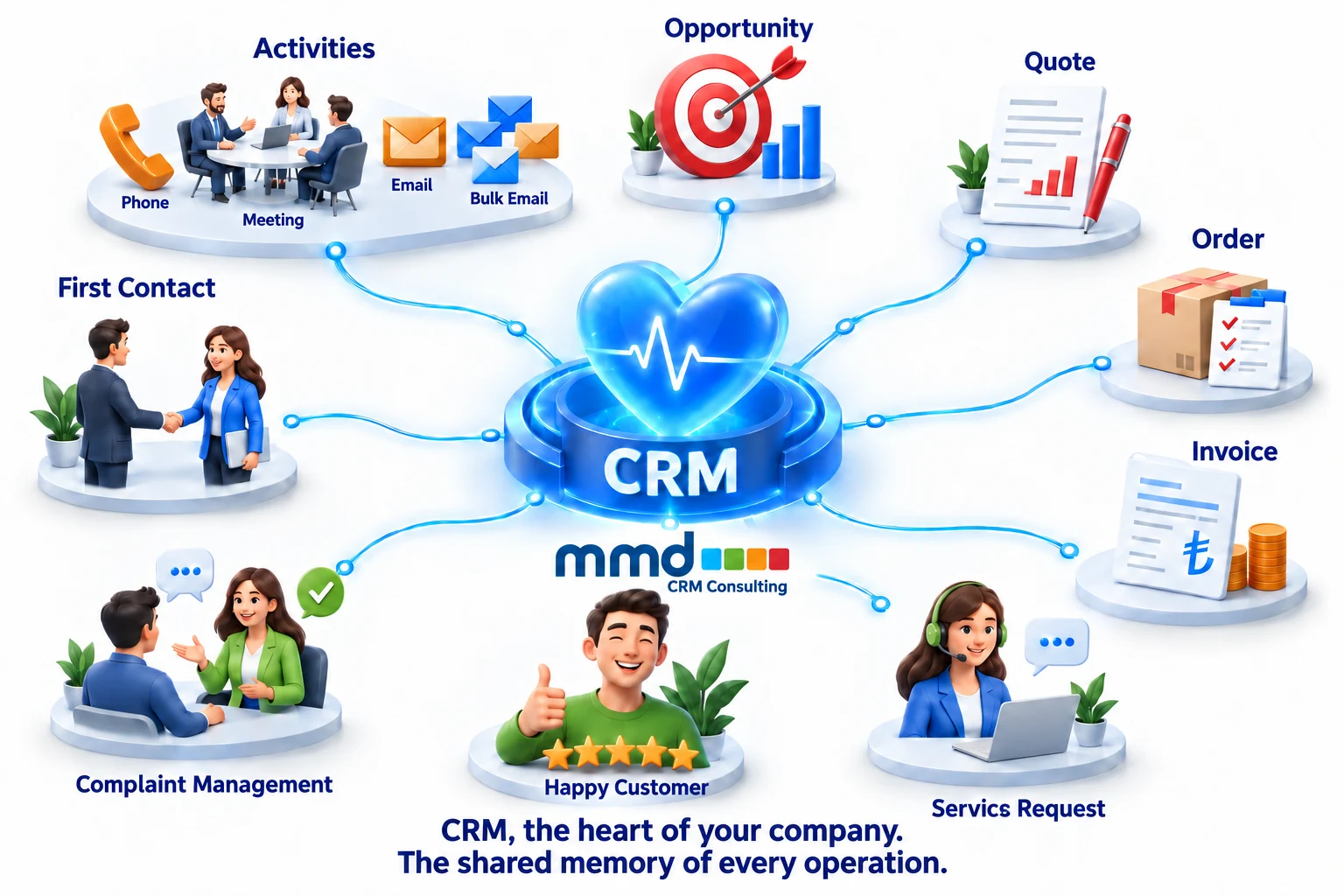
MMD CRM Consulting: CRM, the heart of your company. The shared memory of every operation.
THE CUSTOMER JOURNEY WITH CRM

From first contact to lasting satisfaction.

Each step connects to the same customer story. Activities can recur throughout the process; the workflow adapts to your business.

  1. 01

    First contact

    Understand the lead, record their needs and agree the next step.

  2. 02

    Phone call

    Keep every call in the customer history.

  3. 03

    Meeting

    Clarify requirements and assign responsibilities.

  4. 04

    Email

    Connect correspondence to the customer and opportunity.

  5. 05

    Email campaigns

    Reach relevant audiences with permission and track responses.

  6. 06

    Opportunity

    Make sales stages, expectations and follow-up dates visible.

  7. 07

    Quote

    Manage products, prices and approvals in a clear workflow.

  8. 08

    Order

    Turn an accepted quote into an actionable order.

  9. 09

    Invoice

    Connect invoicing and collections through suitable systems.

  10. 10

    Service request

    Route requests to the right team and track resolution.

  11. 11

    Complaint management

    Understand feedback and address recurring causes.

  12. 12

    Satisfied customer

    Confirm the resolution and continue the relationship.

FOUR CONNECTED AREAS OF CRM

Build your corporate memory.
Make your customers feel valued.

The value of CRM goes beyond collecting data: it enables sales, service, marketing and management teams to work from the same customer story.

01 / SALES

Every conversation brings knowledge.
Every insight becomes part of your corporate memory.

Customer relationships begin with calls, emails and meetings and develop through opportunities, quotes, orders and invoices. CRM sales management connects these stages through related records. Your team can see what was offered, which terms were discussed and who owns the next step.

A customer relationship should not start over when an employee is away or changes roles. Recorded conversations and open tasks help the team continue where it left off. Remembering customer needs, considering earlier requests and responding on time create a consistent experience.

Useful indicators: Opportunities without a next action, pending quotes, time in each stage and reasons for wins or losses.
02 / SERVICE
Simplify service management.
Strengthen customer satisfaction.

Receiving a request, routing it to the right team and following its resolution require a shared process. CRM service management makes status, priority, ownership and customer conversations visible. Teams can consider an issue with its history, without asking customers to explain it repeatedly.

Complaint management belongs in the same process. Classifying causes, identifying recurring issues and following feedback after resolution provide evidence for service improvements. Satisfaction should reflect whether the problem was actually resolved, not just how quickly a record was closed.

Useful indicators: First response time, resolution time, age of open requests, reopened cases and customer feedback.
03 / MARKETING

Reach more customers.
Grow through better relationships.

Connecting call center and bulk email infrastructure with CRM links marketing interactions to sales outcomes. Tracking customer segments, campaign sources and responses together helps identify which interactions become real needs. Calling and email tools, integration options and licensing are assessed during discovery.

Sending more messages does not automatically improve marketing. Relevant content, timing, communication preferences and permissions should be considered together. Measure a campaign by its contribution to qualified conversations, opportunities and customers, as well as opens and clicks.

Useful indicators: Leads by source, conversion to qualified opportunities, campaign contribution and communication preferences.
04 / REPORTING
Understand the pulse of your business.
Build your roadmap with data.

Dashboards bring together workload, activities, quote status, opportunities and service performance. Revenue and profitability require suitable finance and cost data. Opportunity stages and forecasting rules should have shared definitions, so reports give consistent answers.

CRM reports and Power BI analysis can guide investment in customer segments, improvements to sales stages and increases in service capacity. A report becomes valuable when a finding leads to a decision and an action with a clear owner. Measuring the outcome helps keep the business roadmap up to date.

Useful indicators: Revenue, clearly defined profitability, sales pipeline, quote conversion, activity completion and service target compliance. Explore Power BI and data science →

CRM GUIDE

What is CRM?
The complete customer story.

CRM means customer relationship management. It brings customer details, conversations, opportunities and service requests into a shared structure. Teams can see who last contacted a customer, which quote is open and which support request is waiting.

Successful CRM implementation involves more than installing software. Data models, understandable workflows, role-based access and daily user adoption must be designed together.

Let’s explore your CRM needs ↗

Customer lifecycle

Lead→Opportunity→Quote
Sale→Service→New need
Example process · Workflows are adapted to your organization.

What does CRM do? CRM brings marketing, sales and customer service together around the same customer record. A call can become an opportunity, a quote and then an order. After-sales requests and complaints retain the same customer history. CRM consulting turns these connections into measurable processes suited to your company.

First contact and customer acquisition in CRM

A trade show contact, website inquiry or request to the sales team can become a CRM lead. Source, interests, ownership and the next step are recorded together. CRM makes follow-up responsibilities and dates visible. When a lead qualifies, an opportunity moves tracking from personal notes into a shared business process.

CRM activities: calls, meetings and email

Linking calls, meetings, tasks and emails to customers or opportunities creates a shared communication history. Activity management also organizes the next meeting and follow-up responsibilities. Bulk email requires consideration of audiences, preferences, permissions and campaign responses. Marketing tools and integrations are selected separately.

CRM opportunity management and the sales process

Every opportunity needs a clear requirement, stage, expected close date and next action. A CRM pipeline shows what is progressing, what is waiting and why deals are lost. Shared stage definitions make expectations comparable across teams. Reliable forecasting depends on regularly updated amounts and probabilities.

Connecting quotes, orders and invoices

CRM quote management helps track products, services, prices and approvals. Converting quotes to orders and showing invoices in customer history may require a shared CRM and ERP or accounting design. Decide which system owns each record from the start. Showing invoices in CRM does not replace accounting: financial sources and integration responsibilities must remain clear.

Service requests and complaint management with CRM

Service management tracks ownership, priority, status and resolution. Complaint management goes further by identifying recurring causes and improving operations. CRM gives support teams access to customer history, previous conversations and open requests. Access should match each role and business need.

The CRM goal: lasting customer satisfaction

Satisfied customers experience a consistent journey. Sales information reaches service teams, requests receive timely responses and resolutions are followed up. CRM cannot guarantee satisfaction, but it makes processes and responsibilities visible. Feedback, recurring complaints and churn indicators help set improvement priorities.

CRM data quality and permissions

Duplicate customers, missing contact information and inconsistent sales stages weaken reporting. Define ownership, required fields, duplicate checks and update responsibilities clearly. Not every user needs every record. Company, team and role-based access keeps customer information within the appropriate scope.

CRM consulting and user adoption

A good CRM screen supports daily work. Real scenarios, role-based training and user feedback belong in the consulting process. Look beyond login counts to tracked opportunities, completed activities and current customer records. A small, measurable starting point creates a sound foundation for further development.

MICROSOFT DYNAMICS 365

From sales to customer service,
start with what you need.

The Dynamics 365 family includes applications for different business needs. Defining sales and service requirements separately is the basis for choosing the right applications and evaluating licenses.

Dynamics 365 Sales

Manage accounts, contacts and opportunities, following the process from lead to order. Sales is a model-driven application running on Dataverse.

  • Account and contact records
  • Lead and opportunity management
  • Sales activities and process tracking

Official source: Microsoft Learn — Dynamics 365 Sales ↗

Dynamics 365 Customer Service

Manage support cases, service processes and a knowledge base. Service-level agreements define targets for requests. Available capabilities depend on licensing and configuration.

  • Case and resolution management
  • Shared knowledge through a knowledge base
  • Tracking service-level targets

Official source: Microsoft Learn — Customer Service ↗

ERP / Business systems
Web / Customer portal
Dynamics CRM ↔ .NET / API
Data & Reporting
Document workflows
Conceptual architecture · Connections are defined through discovery and technical analysis.
INTEGRATION & .NET

Stop entering data twice.
Connect your systems.

We design how customer, product and transaction data should move between CRM and existing business systems. .NET development and suitable APIs can support workflows specific to your business.

An integration must be observable as well as functional. Data mapping, permissions, duplicates and failed transfers are all part of its design.

Technical source: Microsoft Dataverse Web API documentation ↗

POWER BI · REPORTING · DATA SCIENCE

Reports explain the past.
Good analysis guides the future.

A business roadmap needs more than intuition or month-end totals. CRM reporting reveals stalled sales, customer behavior and service problems. When management connects findings to targets, budgets and resources, reporting becomes part of planning.

What is Power BI? Power BI is Microsoft’s business analytics platform for connecting, modeling, visualizing and sharing data. Sources such as CRM, Excel and SQL can be prepared for joint analysis through appropriate connectors. Reports can reveal details by period, team or customer.

Official source: Microsoft Learn — What is Power BI? ↗

From data to a roadmap

ObserveExamineAct
CRM data→Analysis→Decision→Follow-up
Conceptual illustration, not actual performance data or a growth promise.

Every report should answer: “What will we change as a business based on this information?”

How do CRM reports support your business roadmap?

Business questionIndicator to trackImpact on the roadmap
Where are sales stalling?Time in opportunity stages and quote conversionPrioritize sales training, quote approval or follow-up improvements.
Which channels bring qualified customers?Opportunities and customers won by source; campaign costs where availableReview marketing budgets against customer contribution, not just inquiry volume.
Where is support capacity under pressure?Case age, resolution time and reopened recordsPlan team capacity, knowledge base content and product improvements.
Why is customer satisfaction changing?Complaint causes, recurring problems and feedbackSelect operational and service improvements that address underlying causes.
Which customer segments should we invest in?Sales history, service needs and profitability data where availableSet service and growth priorities by customer segment.

Data science: what happened, what could happen?

Reporting makes current and past conditions visible. With suitable data, data science supports models for segmentation, demand forecasting or churn risk. Microsoft Fabric Data Science provides tools for preparation, exploration, modeling and bringing predictions into business analysis. This is distinct from a Power BI report and needs its own problem definition, validation and monitoring.

Microsoft Learn — Fabric Data Science ↗

From decisions to measurable actions

A finding needs a target, an owner and a review date to become part of the roadmap. If quotes stall at an approval stage, change that process and measure the same indicator again. Reporting should help identify effective interventions. Predictions depend on data quality and assumptions and should not be treated as certain outcomes.

Shared definitions make reports reliable

“Won opportunity”, “active customer” and “resolved case” must mean the same thing across teams. Define refresh schedules, reporting periods, missing data and access rights. Before combining CRM and finance data for decisions, validate customer identifiers and calculation rules.

Start with the management question, then the dashboard

A few critical decision questions are more useful than a crowded dashboard. Select indicators for sales growth, retention or service quality, and identify the operational steps that affect them. CRM reporting and Power BI can then provide sustainable monitoring aligned with strategic goals.

OUR EXPERIENCE & WORKING DISCIPLINE

Senior expertise. Cross-industry experience.
Solutions built around the user.

Our team includes senior specialists whose software development experience dates back to 2003. We draw on work at Microsoft partners and on large enterprise projects to understand requirements, connect systems and build maintainable solutions. This experience informs design and implementation decisions that make our customers’ daily work easier.

Our experience spans sales and service operations, collections, donation management, call centers, education, schools and aircraft maintenance processes. In automated sales and quotation workflows, AI applications and system integrations, we aim to reduce repetitive work, keep information flowing accurately and make users’ tasks easier.

We turn complex requirements into systems that users can understand and use comfortably, and that teams can maintain confidently. Our experience in critical projects shapes our attention to detail and quality expectations.

We pursue an excellent experience through clear requirements, careful development, real-world testing and user feedback. For us, user-friendly design is a principle from the start, not an addition at the end.

01

Understand the need

Consider business goals, critical scenarios and the user’s daily workflow together.

02

Simplify complexity

Manage technical details while keeping screens and steps understandable.

03

Build quality into the process

Treat verification, testing and user acceptance as part of delivery.

04

Develop with users

Use real usage feedback to improve the solution.

LET’S SHAPE YOUR PROJECT TOGETHER

Understand the need first.
Then build the right solution.

Our CRM project approach connects business goals, data quality, user acceptance and sustainable support.

01

Discovery & scope

Define existing processes, roles, data sources and success measures.

02

Design & configuration

Plan the data model, screens, business rules and system connections.

03

Testing & training

Complete user acceptance and team training with real scenarios.

04

Go-live & support

Prepare data checks for go-live and track requests and improvements.

OUR SUCCESS STORIES

Different organizations.
Real business needs.

CRM & TRAINING PROCESSES

AÇEV

Family communication and training planning with Dynamics CRM; access to information through SharePoint.

CORPORATE PORTAL

Aydınlı Grup

Internal communication and management through SharePoint, integrated with other systems.

CUSTOMER MANAGEMENT

Sentim Bilişim

Customer portfolio management with Dynamics CRM infrastructure and reports.

COMMUNICATION & MOBILE ACCESS

KVK

Corporate communication through SharePoint and mobile access for field teams.

Summarized from MMD’s published project stories. These describe past work.

MICROSOFT RESOURCE LIBRARY

Get to know the product at its source.

Product summaries, CRM scenarios and project guidance based on Microsoft Learn. Every guide includes a link to the current official documentation.

FREQUENTLY ASKED QUESTIONS

Before you start your CRM project.

What is CRM consulting and what does it include?

CRM consulting analyzes customer, sales and service processes, identifies the right structure and adapts the system to business needs. Scope may include migration, integration, permissions, training and ongoing support. First, clarify the problem to solve and how success will be measured.

How do Dynamics 365 Sales and Customer Service differ?

Sales focuses on leads and opportunities. Customer Service supports cases, knowledge and service processes. If sales and after-sales service are implemented together, their workflows and data relationships should be designed together.

Can CRM integrate with our ERP or custom software?

Integration depends on the APIs and data access available. First determine where customer, product, order or support data is managed. Then design mappings, direction, frequency, error tracking and permissions. Dataverse Web API is one Microsoft interface that can support these connections.

How are CRM project duration and cost determined?

User count is not enough. Processes, data quality, integration scope, custom development and training needs all matter. Separating licensing from implementation services produces a more realistic scope and plan.

Can we migrate Excel or legacy CRM data?

Migration depends on the available source structure and target model. Review duplicates, required fields, customer relationships and ownership first. Plan go-live after trial migration, sample checks and user acceptance.

What should we ask when choosing CRM?

Ask how sales and support will work, who can access data, which systems connect and which decisions reports should support. Evaluate real scenarios, not just feature lists. Clarify training and maintenance responsibilities at the start.

Product sources reviewed: 8 October 2026.

Let’s explore
your CRM project together.

Let’s discuss your project ↗
OUR REFERENCES

Organizations we create value with.

Turkish Technic
Destek
Ekol
KVK
Aydınlı
Radore
Este
Sentim Bilişim
Fiba Group
Ermetal
Treo
Mektebim
Yeşilay
Netcad
Tualcom
Fujifilm
CONTACT DETAILS

Ready to work with you at both offices.

Altunizade Office

Altunizade Mahallesi
Ord. Prof. Dr. Fahrettin Gökay Caddesi
No:27
Arduman İş Merkezi
Üsküdar / İstanbul

Sancaktepe Office

Abdurrahmangazi Mahallesi
Sevenler Caddesi / Asır Caddesi, No:1
EgeBoyu Ticari Ofis
Block B, Office 30
Sancaktepe / İstanbul
MMD Bilişim Teknoloji A.Ş. · Altunizade & Sancaktepe / İstanbulinfo@mmd.com.tr+90 532 379 40 95+90 531 737 12 24MMD CRM & Power BI · All rights reserved.